

Quick answer
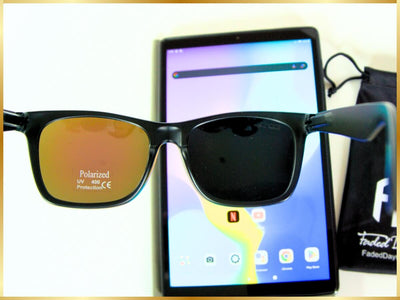
Polarized sunglasses can make a phone screen look dark when the lens filter blocks some of the light leaving the display. Try rotating the phone while keeping your head still. The result depends on the phone, the lenses and the angle; turning up brightness is not a guaranteed fix.
If you've ever stepped outside, glanced at your phone, and been met with a dark, unreadable screen, you're not alone. For many people, polarized sunglasses are both a blessing and a curse—great for blocking glare, but not so great when your screen turns into a black mirror.
This post breaks down why this happens, how it affects different types of screens, and what you can do if you’re tired of tilting your head like a confused dog just to read a text. As the folks behind our world-famous polarized sunglasses for big heads, we’ve spent more time than we’d like to admit during testing, squinting at darkened screens—and we’re here to help you avoid that fate.

Let’s get into why your phone screen and sunglasses aren’t getting along, and what to do about it.
Why Can’t I See My Screen with Polarized Sunglasses?
If the screen looks normal without your sunglasses but becomes darker or changes appearance through them, the lenses and display may be interacting. If the problem is still there without your sunglasses, check the phone itself rather than assuming polarization is the cause.
Here’s the short version: a polarizing filter lets light through according to its polarization direction. That helps reduce reflected glare, but it can also block polarized light coming from a display. Change the angle between the screen and your lenses, and the amount of light reaching your eyes can change. Huawei’s screen guidance describes this interaction and recommends rotating the phone.
LCD displays can be affected, and the label “OLED” is not a screen-compatibility guarantee. Samsung Display describes different OLED constructions, including designs with and without a separate polarizer. Try the particular phone and sunglasses together instead of choosing a phone by screen type alone.

Are Polarized Sunglasses Worth It If I Can’t Use My Phone?
This is the million-dollar question, and the answer is: usually, yes.
Polarized lenses cut harsh glare and eye strain—especially when you’re near water, driving in bright conditions, or just trying to enjoy a sunny day without squinting like Clint Eastwood. The screen issue is a real downside, but for many people, the benefits outweigh the inconvenience.
- Adjust your screen’s brightness and angle
- Try the exact sunglasses with the screens you use most
- Consider a non-polarized lens for certain activities
We design Hypoallergenic TR90 flexible polarized sunglasses for people who want comfort, function, and style—but that doesn’t mean one lens fits all. If phone usage is a big priority for you, knowing how different lenses behave is key.
How to See Your Phone with Polarized Sunglasses (Without Ditching Your Shades)
If you already own polarized sunglasses and love them—but hate the screen situation—here are a few fixes to try. Stop somewhere safe first; don’t experiment with your phone or sunglasses while driving, cycling or operating equipment.
1. Try Rotating Your Phone
Keep your head still and slowly rotate the phone from portrait toward landscape, checking the angles in between. If readability changes, use the position that works for that phone and pair of lenses. A quarter-turn is worth trying, but no single angle works for every combination.
2. Check Your Brightness
If the display is simply too dim, adjusting brightness may help. It does not change the alignment of the polarizing filters, so it may not restore a screen that looks black through the lenses. Check the angle first. If your iPhone or iPad dims even without sunglasses, Apple’s brightness guidance also explains automatic adjustment and heat-related dimming.
3. Use Voice Commands
Your phone’s voice controls can handle some tasks without reading the display. Use the features your device supports, and save any task that needs your attention for a safe place to stop.
4. Check Your Own Phone and Lenses
Before buying a different phone or pair of sunglasses, try the combination in the positions you normally use. Check a message, your camera view and any display you depend on. A result with one screen does not predict every other screen, and an OLED label alone does not settle it.
5. Get a Backup Pair
A non-polarized pair may be useful when reading displays is a priority. It avoids this particular interaction between a polarized sunglass lens and the screen, but lens tint and outdoor glare can still affect readability. Choose suitable UV protection as well; polarization and UV protection are separate features.
What About Prescription Sunglasses?
If your prescription sunglasses are polarized, the same screen interaction can apply. A prescription by itself does not tell you whether the lenses are polarized, so check the lens option you’re choosing.
Start with our prescription eyewear options to see the current choices. If screen visibility is a top concern, ask us about the frame and lens option you’re considering before ordering. Our lens information page explains our standard sunglass lens technology; prescription options should be checked separately.
Related: Can Polarized Lenses Get Scratched?
Funny you ask—once you finally get a great pair of polarized sunglasses, nothing hurts more than scratching them up. If you're wondering what to do when that happens, check out our post: Can You Repair Scratches on Polarized Lenses?
Do Any Brands Solve This Problem?
A brand name alone cannot tell you whether a pair will work with your screen. The particular lenses, display and viewing angle matter.
Our XXL Sunglasses are an option for people who need a wider frame. Screen visibility should be checked with the particular phone and lenses you plan to use.
Frame fit and screen visibility are separate things to check. We don’t promise perfect phone clarity in full sun—but when you design for people overlooked by the industry, you sweat the details.
FAQ: Polarized Lenses and Phone Screens
Why does my phone screen go black with my sunglasses on?
If it looks normal without sunglasses and darkens through them at certain angles, polarization may be the reason. The lens filter can block light leaving the display.
Do all polarized sunglasses cause this issue?
Not every phone and lens combination will show the same effect. Some screens darken strongly at certain angles; others change less. Check the pair with the devices you actually use.
Is it worse with mirrored lenses?
A mirrored appearance alone is not enough to predict screen visibility. Check whether the lenses are polarized, then try the actual pair with your phone.
Should I switch to non-polarized sunglasses?
Not necessarily. If you love the glare reduction, keep them and try a few screen tips—or have a second pair on hand.
Do any sunglasses work well with screens?
Some combinations are easier to use than others, but we don’t market a “tech-friendly” lens or guarantee compatibility with every screen. If you’re considering our XXL Sunglasses, choose them for the frame fit you need and check screen visibility separately.
Why does my camera or GPS screen also look strange?
Other displays can also be affected by polarized lenses. Check important navigation and instrument displays before setting off, while safely parked or stationary. Follow the device maker’s guidance if you cannot read them reliably.
Can I test for polarization before buying?
A suitable LCD screen can be a useful check: look through a lens and slowly rotate the glasses to see whether the screen darkens. ZEISS describes this rotation check. If nothing changes with one phone, that alone does not prove the lenses are non-polarized. Confirm the product specification or ask an optician if you’re unsure.

Final Thoughts
So—why can’t you see your screen through polarized sunglasses? The lenses can block polarized light from the display at certain angles. How much changes depends on the screen and the sunglasses.
But now you know what’s happening—and more importantly, what to do about it. Whether you rotate your phone, check the brightness, or grab a backup pair, you’ve got options.
We build sunglasses that actually fit, perform, and feel right—because they were made by people who needed them, too.
Yes but I can’t see the screen in portrait with my sunglasses but on all other screens this is in landscape. Why is it just this phone that this happening too.
Why is my phone showing white as if it’s polarised without colour as well as my photos I’m not wearing polarised glasses by the way
Why is my phone showing white and no colour and everything looks polarised as well as my photos
Wow, this blog post was a real eye-opener! 👓 I’ve always wondered why I couldn’t see my cellphone screen clearly when wearing sunglasses, and now I finally have an explanation. The tips and insights shared here are super helpful, especially the ones about polarization and screen brightness. 💡 I’ll definitely keep these in mind the next time I’m out and about in the sun with my phone. Thanks a bunch for shedding some light on this issue! 🌞 Keep up the fantastic work with your informative content. Can’t wait to try out these suggestions and enjoy a clearer view with my sunglasses! 😎